
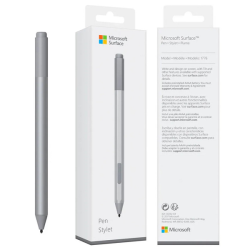
MICROSOFT Stylus Pen – Precision Ink Technology for Modern Digital Creativity
The Microsoft Stylus Pen is an advanced digital writing tool designed for seamless interaction with touchscreen devices, especially the Microsoft Surface lineup. It offers natural handwriting, ultra-responsive input, and professional-grade precision for designers, students, and business users. Built with cutting-edge ink technology, this stylus transforms your device into a powerful creative workstation.
Premium Design & Ergonomic Comfort
The MICROSOFT Stylus Pen is crafted with a sleek, modern, and lightweight design that ensures maximum comfort during long working sessions. Its premium finish complements Surface devices perfectly.
- Slim and elegant pen-style design
- Comfortable grip for long usage
- Magnetic attachment support (on compatible devices)
- Durable build for professional environments
Ultra-Responsive Writing & Drawing Experience
This stylus delivers an exceptional writing and drawing experience with high precision and low latency, making it feel like writing on real paper.
- High pressure sensitivity for natural strokes
- Tilt support for shading and artistic drawing
- Ultra-low latency response
- Smooth ink flow for handwriting and sketching
Smart Features & Advanced Functionality
The MICROSOFT Stylus Pen is packed with intelligent features that enhance productivity and creativity across multiple applications.
- Shortcut buttons for quick actions
- Palm rejection technology for natural writing
- Seamless integration with Microsoft apps
- Bluetooth-enabled smart controls (on selected models)
Compatibility & Productivity Use Cases
This stylus is specially optimized for Microsoft Surface devices and works perfectly with productivity and creative software.
- Compatible with Surface Pro, Surface Laptop Studio, and Surface Go
- Ideal for Microsoft OneNote, Word, Excel, and PowerPoint
- Perfect for graphic design, digital art, and editing
- Useful for students, professionals, and content creators
Everyday & Professional Applications
The MICROSOFT Stylus Pen enhances productivity in multiple fields, making it a versatile digital tool.
- Digital note-taking and classroom learning
- Professional document annotation
- Creative illustration and design work
- Business presentations and brainstorming sessions
Frequently Asked Questions (FAQ)
Q1: Is the MICROSOFT Stylus Pen compatible with all touchscreen devices?
Ans: No, it is mainly designed for Microsoft Surface devices and selected Windows touchscreen laptops.
Q2: Does the Microsoft Stylus Pen require charging?
Ans: Some versions use replaceable batteries, while advanced models are rechargeable, depending on the generation.
Q3: Can I use it for professional drawing and design work?
Ans: Yes, it is highly suitable for professional-level digital art, sketching, and design tasks due to its precision and pressure sensitivity.
Product Compare0
MICROSOFT
Stock: In Stock
Stock: In Stock
- Surface Active Stylus
- Microsoft Pen Protocol 2.0
- Bluetooth 4.0
- Replaceable AAAA battery
9,500৳
Ex Tax:9,500৳
Showing 1 to 1 of 1 (1 Pages)