
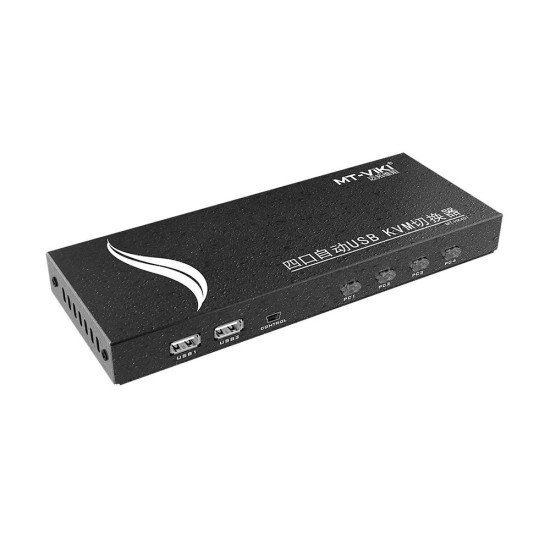




MT-VIKI MT-HK401 4 Port HDMI KVM Switch
- Regular Price:
6,500৳ - Stock:
In Stock - Brand: MT-Viki
- Model:
MT-HK401 - SKU:
13564
| General Information | |
| Resolution | Up to 4096×2160/3840×2160@ 60 Hz(4:4:4) |
| Connectivity & Wireless | |
| Interface | INPUT INTERFACE: 4* HDMI+4* USB-B |
| Others Information | |
| Others | CONTROLLABLE NUMBER OF HOSTS: 4 INPUT INTERFACE: 4* HDMI+4* USB-B PORT SELECTED: Press-button, desktop controller, Hot-key MOUSE SIMULATION: USB HDMI VERSION: HDMI2.0 HDCP2.2 STORAGE: Temp. -20 – 60 ℃ HUMIDITY: 0-80% RH, Non-condensing |
The MT-VIKI MT-HK401 4 Port HDMI KVM Switch allows four computers or HDMI source devices to share one HDMI monitor, one keyboard and one mouse from a single console. MT-VIKI officially identifies the MT-HK401 as a 4-port HDMI KVM with USB peripheral sharing, hotkey control, front-button switching, auto scan and a wired desktop controller.
It is suitable for office desks, IT workstations, small server environments, surveillance systems, testing benches and users who regularly switch between multiple computers without wanting separate monitors and input devices for each system.
The MT-HK401 supports up to 4 connected computers, allowing them to share:
MT-VIKI describes the unit as a 4-in-1-out HDMI KVM switch specifically designed for four computers.
This model needs slightly careful wording because MT-VIKI’s official page gives two related limits:
So the safest Gadget & Tech headline is:
Up to 4K@30Hz, or 4K@60Hz at 4:2:0 on compatible equipment
Avoid advertising this exact model simply as “4K60 4:4:4.”
The MT-HK401 includes four USB 2.0 console-side ports for keyboard, mouse and compatible USB devices. MT-VIKI specifically mentions use with:
This allows selected peripherals to follow the active computer instead of being duplicated on every workstation.
The KVM supports keyboard hotkey switching, making it possible to move between computers without pressing buttons on the main unit.
This is useful when the switch is placed out of easy reach or when frequent switching is required.
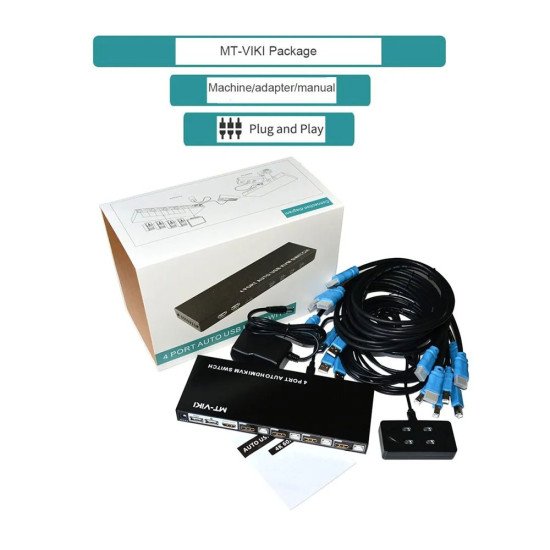
A separate wired desktop selector/controller is included in the package. This allows the main KVM box to be placed away from the user while keeping a small switching control within reach.
MT-VIKI officially lists four switching methods:
This gives users flexibility depending on how the KVM is installed.
The MT-HK401 supports EDID, helping the connected computer recognize the display configuration when switching between different sources.
EDID support can help reduce unwanted resolution changes in compatible setups.
MT-VIKI specifically notes support for mechanical keyboards and mice.
Wireless keyboard/mouse support is also mentioned on the manufacturer page, although compatibility can vary depending on the receiver and device behavior.
MT-VIKI states that the KVM can work with compatible:
The manufacturer recommends reducing resolution to around 1080p for VGA and 2K for DVI when using these converters.
The MT-HK401 is designed as a plug-and-play KVM switch for normal operation and does not require a dedicated switching application. MT-VIKI lists compatibility across Windows, macOS, Linux and several legacy operating systems.
The official package includes a 5V power adapter, helping provide stable operation when multiple USB devices are attached.
Brand: MT-VIKI
Model: MT-HK401
Product Type: HDMI KVM Switch
Number of Computers: 4
Video Input: 4 × HDMI
Video Output: 1 × HDMI
Host USB Input: 4 × USB-B
Console USB: 4 × USB-A / USB 2.0
Standard 4K Support: Up to 3840×2160 @30Hz
Additional 4K Mode: Up to 4K@60Hz at 4:2:0
EDID: Supported
Switching Methods: Hotkey / Button / Wired Desktop Controller / Auto Scan
USB Peripheral Sharing: Yes
Mechanical Keyboard Support: Yes
Hot Plug: Supported
Housing: Metal
Power: 5V External Adapter
Operating System Support: Windows / macOS / Linux and other supported systems
Color: Black
MT-VIKI officially lists:
There is conflicting retailer wording around this model. Some Bangladesh retailer specification tables state 4K60 4:4:4, but that same retailer’s product description later says 4K30 or 4K60 at 4:2:0. MT-VIKI’s own exact-model page also explicitly states 4K60 at 4:2:0, not 4:4:4.
For Gadget & Tech, I recommend publishing:
Maximum Video: 4K@30Hz, or 4K@60Hz at 4:2:0 on compatible hardware
That is the safest exact-model specification.
Do not confuse MT-HK401 with MT-HK401W.
They are not the same product.
The shared USB hub is USB 2.0, not USB 3.0.
For high-speed external SSD transfer, users should not expect USB 3.x performance through the KVM.
For Gadget & Tech, publish the warranty according to your actual supplier/importer stock.
If you are searching for the MT-VIKI MT-HK401 price in Bangladesh, this 4-port HDMI KVM switch is a practical option for managing multiple computers from a single keyboard, mouse and monitor.
With 4-computer control, 4K video support, USB 2.0 peripheral sharing, hotkey switching, wired desktop control, auto scan and EDID support, it is suitable for office environments, IT workstations, testing setups and small server installations.
Buy the MT-VIKI MT-HK401 4 Port HDMI KVM Switch in Bangladesh from Gadget & Tech and check the latest price, stock availability and warranty before ordering.